Appearance
Annotations
Annotations are your private notes laid over a recipe — the "I used half the sugar" and "add the garlic later" wisdom that usually gets scribbled in a margin.
What an annotation is
An annotation is a note anchored to a specific spot in a recipe — a particular ingredient, a step, or a passage of text. It sits as an overlay on top of the recipe; it doesn't change the recipe itself.
Because annotations overlay rather than copy, you keep reading the original recipe with your notes in place — and if the underlying recipe changes, your notes stay attached where they still make sense.
Adding an annotation
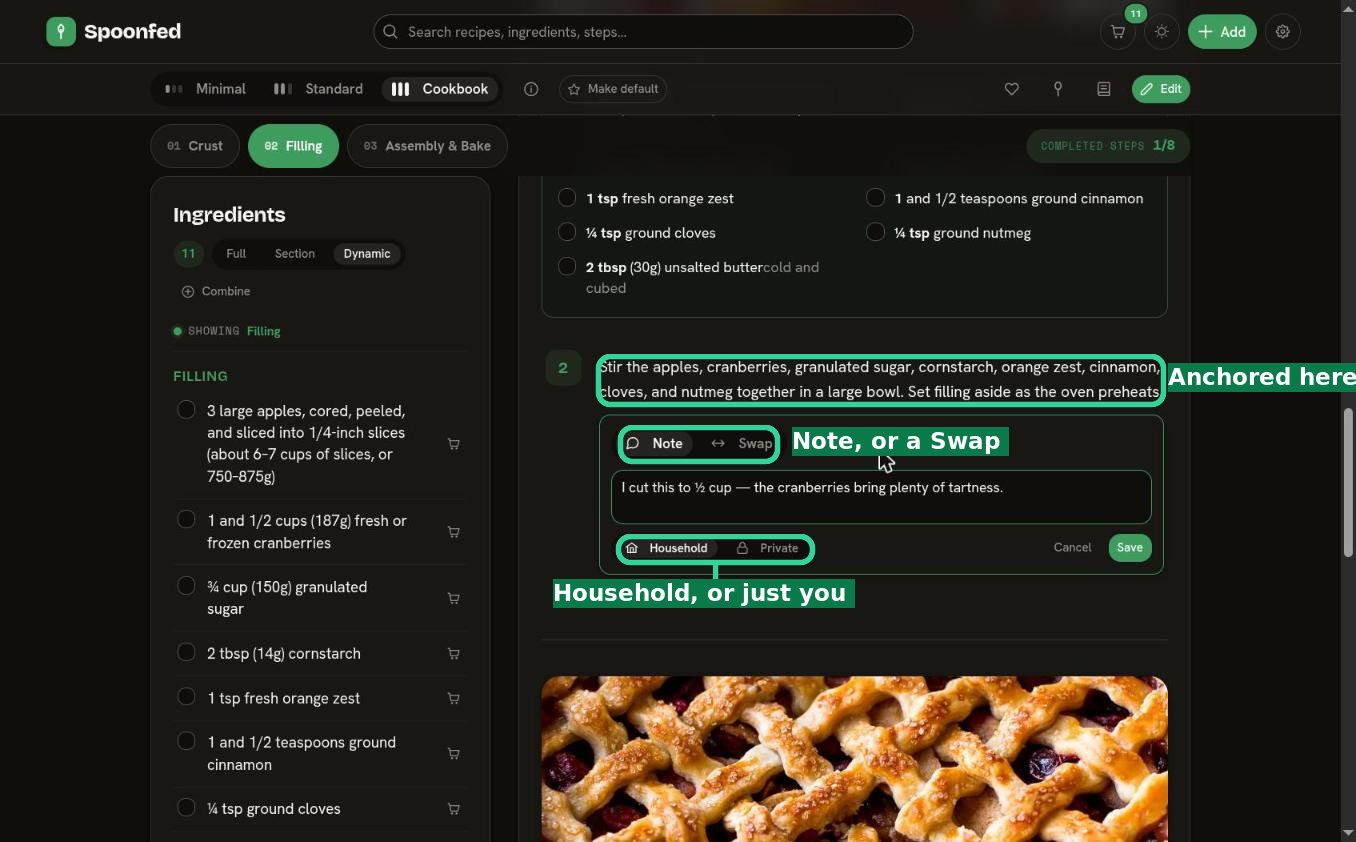
Select any text in a recipe — an ingredient, a step, a phrase — and an Annotate button appears. From there you can:
- Note — jot a tweak, a timing, or a reminder against that exact spot.
- Swap — record a substitution you make for that ingredient or step.
Choose whether the annotation is visible to your whole Household or kept Private to just you, then save.
Private to your household
Annotations are private to your household by default — they're your kitchen's notes, not public commentary, so you can be candid about what worked and what didn't. You can also mark an annotation Private so it's visible to just you.
Quick recipe notes
Not every thought needs to be pinned to an exact spot. Each recipe also has a Notes panel — a single free-form box ("Substitutions, tweaks, what you'd change next time…") for a catch-all note about the whole recipe. Use it for the general stuff; use anchored annotations when a note belongs to a particular ingredient or step.
Annotation vs. editing
- Want to jot a note without changing the recipe? Annotate it (or use the Notes box).
- Want to actually change the ingredients or steps? Edit it — which makes your own forked copy.
Reach for annotations while you cook; reach for editing when you want a different recipe.